Summary
We’ve added the ability to customise the radiative forcing factor used in air and charter jet segments, to comply with your preferred authority.
A new impact report page has been added to give insights into the expected carbon reductions from electric vehicles as they become more dominant.
Companies that have purchased Carbon Reductions can now have these logged in their instance to view resultant net emissions.
The last 2 months has yielded many enhancements to the Thrust Calculator including the ability to customise the name of all reports, header matching for the bulk uploader and the ability to delete empty groupings.
Coming next is a Data Quality Dashboard which will shed light on all the data within your segments and help you identify issues and areas of improvement.
The next month will also bring 3 new segment types for Thrust Events, enabling the emissions from purchased goods/materials, shipping and material waste to be calculated.
Spotlight on…
1. Custom Radiative Forcing
Relevant to:
All Thrust Calculator and Thrust Events users
What is it?
Radiative forcing (also referred to as contrail effects), in the context of aviation is the impact of releasing a greenhouse warming gas at altitude. We have now introduced the ability for our customers to choose which radiative forcing factor they wish to use from a variety of authorities including:
UK Government
Intergovernmental Panel on Climate Change (IPCC)
International Journal of Life Cycle Assessment (2019)
Atmospheric Environment Journal (2021)
This feature is to enable you to comply with your policies or local regulations.
How can I access this?
For details on how to edit your radiative forcing check out this article:
2. Purchased Reductions
Relevant to:
Thrust Calculator users (Enterprise and Premium)
What is it?
Purchased Reductions (also known as carbon insetting) is the practice of implementing nature-based solutions within a company's supply chain which are designed to generate carbon reductions and carbon storage. These reductions can form an important part of a company's journey to net zero emissions.
We have now introduced the ability for you to add Purchased Reductions to your instance and view the impact these have on the net emissions of your travel program.
How can I access it?
For details on how to add and view the impact of Purchased Reductions check out this article:
3. Electric Vehicle Insights page
Relevant to:
Thrust Calculator users (Enterprise and Premium)
Thrust Calculator resellers
What is it?
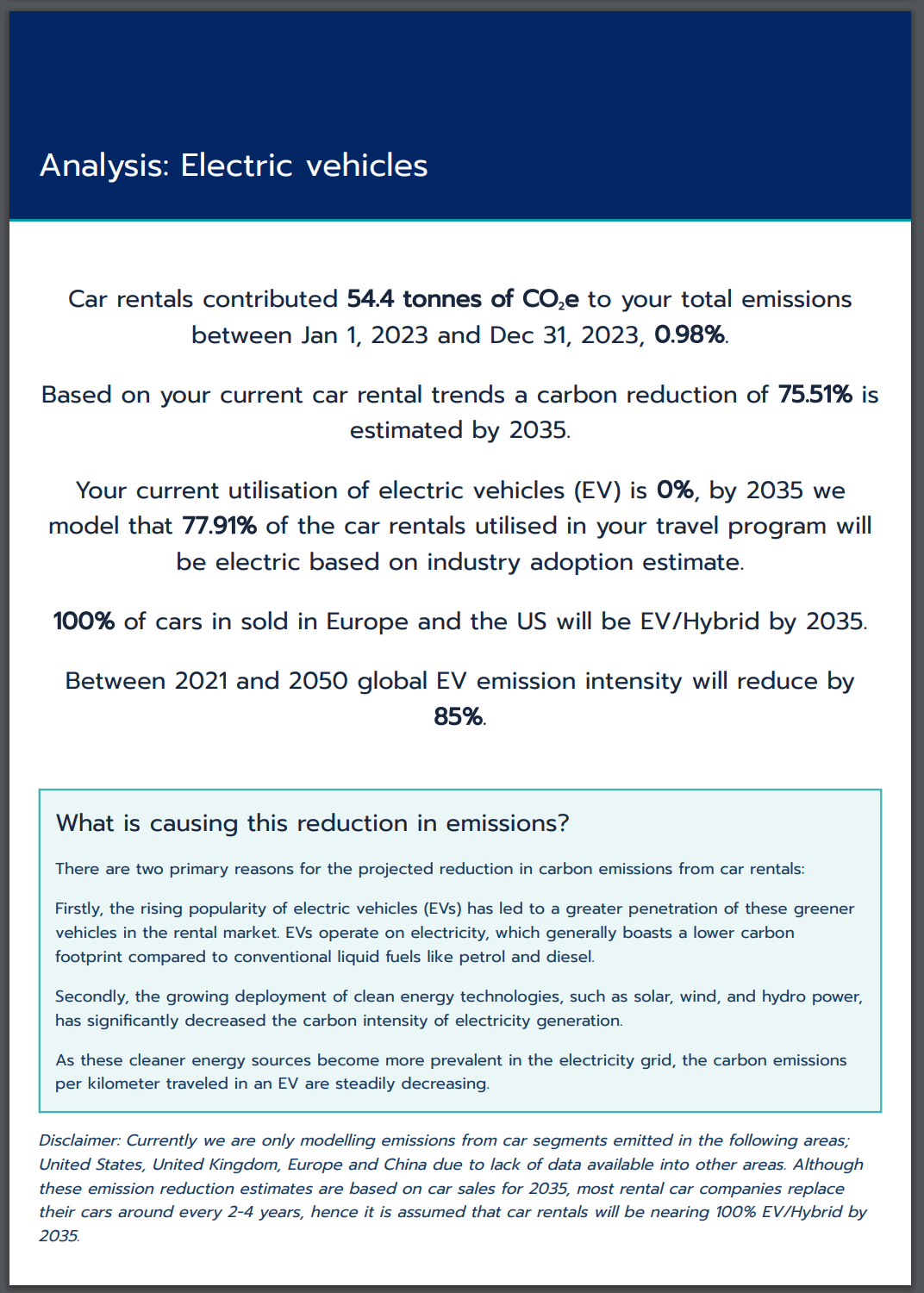
With data-driven insights, this new page in the 'Full Impact report’ provides readers with a comprehensive overview of the carbon reduction trends stemming from the growing presence of electric vehicles in the rental market
On this page readers will be able to view the estimated reductions from their car rental program by 2035 as a result of increased EV adoption in rental fleets and reduced carbon intensity of electricity.
How can I access it?
To view the new EV report page, you need to generate a full report from your instance. View this article for information on how to create a report.
Once you have downloaded the report, navigate to the page titled “Analysis: Electric Vehicles” as shown below to gather insights on your rental program.
Other New Features
New Zealand Methodology for Car & Hotel
We now support a New Zealand Specific methodology for Car and Hotel segments as well as air segments. This methodology can be applied whenrequested through the API.
"methodology_requested": "new_zealand"
Duplicate Segments
It is now possible to duplicate segments in your instance. For more details on how to do this check out this article.
Delete Groupings with no segments attached
It is now possible to delete groupings within your instance which have no data assigned to them. The cause of these empty groupings may be due to bulk uploads that were then deleted. These empty groupings can cause issues when you generate reports as these groupings may still appear but with an emission of zero.
To delete these groupings navigate to your whitelabel settings -> Data Groupings. The empty groupings are deleted by grouping type, so you may need to go through all your grouping types to delete all the empty groupings. At the bottom of the page, as shown below, there is a button “Delete Empty Groupings” - this will remove all groupings within this grouping type that do not have any data.

Impact Report Summary Page
On every impact report we have now implemented a summary page which states the report details and which filters have been applied.
Improvements
Bulk Uploader Improvements
- The bulk uploader will now match the headers to the spreadsheet you are uploading, as shown below, these input boxes will also be highlighted to ensure easy identification. The accepted headers which will match are stated in this spreadsheet: Spreadsheet Preparation for Bulk Uploads.
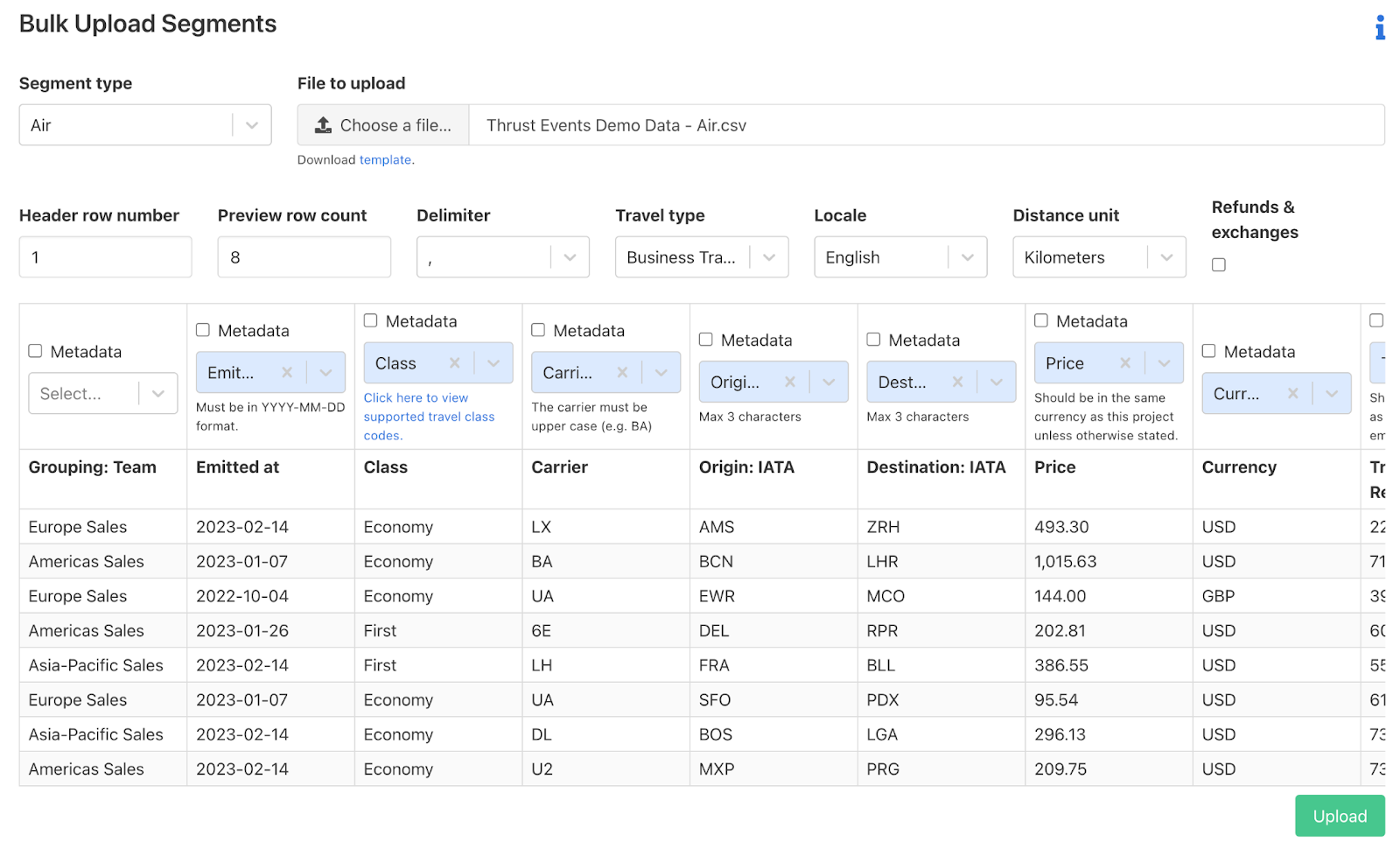
- Hints and links to the knowledge base for further details are also now displayed when you select certain headers, as shown below.

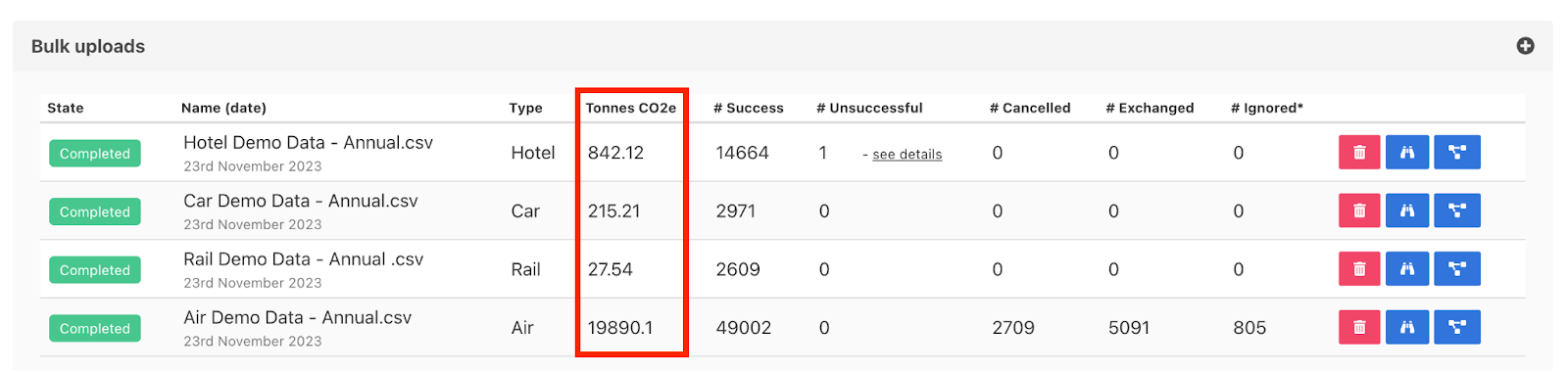
- Bulk Upload EmissionsThe emissions from individual bulk uploaded files are now displayed on the bulk uploads drop down on the Segments tab, as shown below. This will give better visibility into the emissions derived from different uploads.
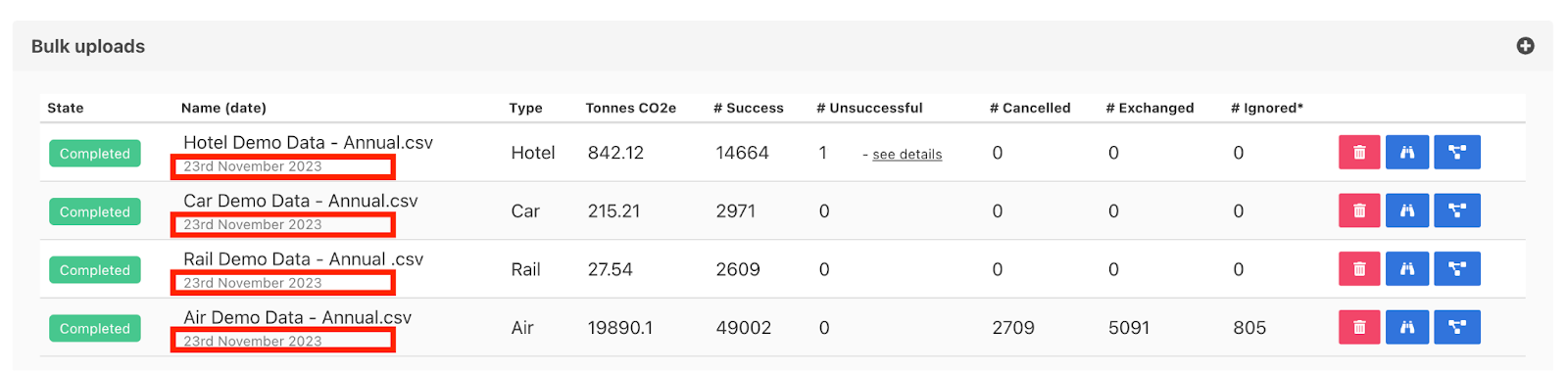
The exact date of when a file is bulk uploaded to the Thrust Calculator is now stated on the bulk uploads drop down on the Segments tab, as shown below.
Naming Reports
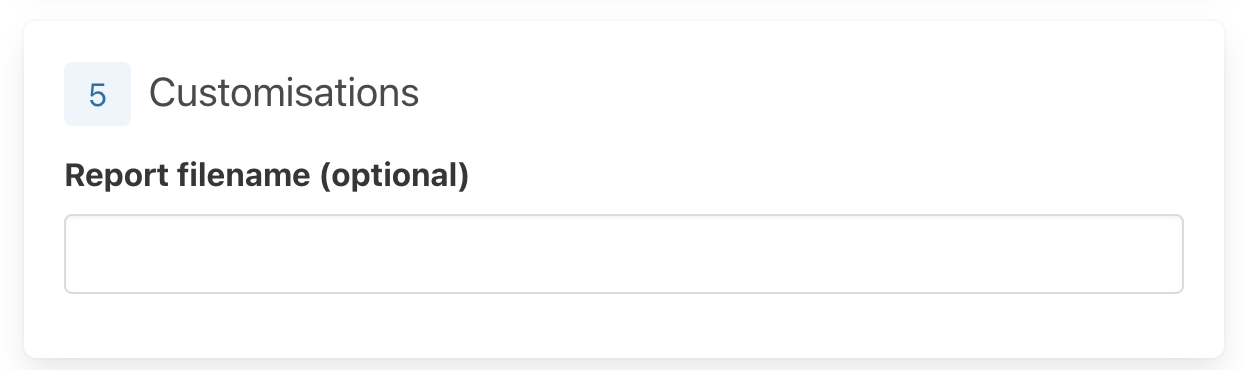
Like with the Impact Reports, we have now made it possible to name your CSV exports and Thrust Events Reports to help identify the reports you have created. As always this customisation is optional, and a default name ( Instance Name - Report Type - Date) will be given if not filled in.
Inclusive Date Range for “Period” dates.
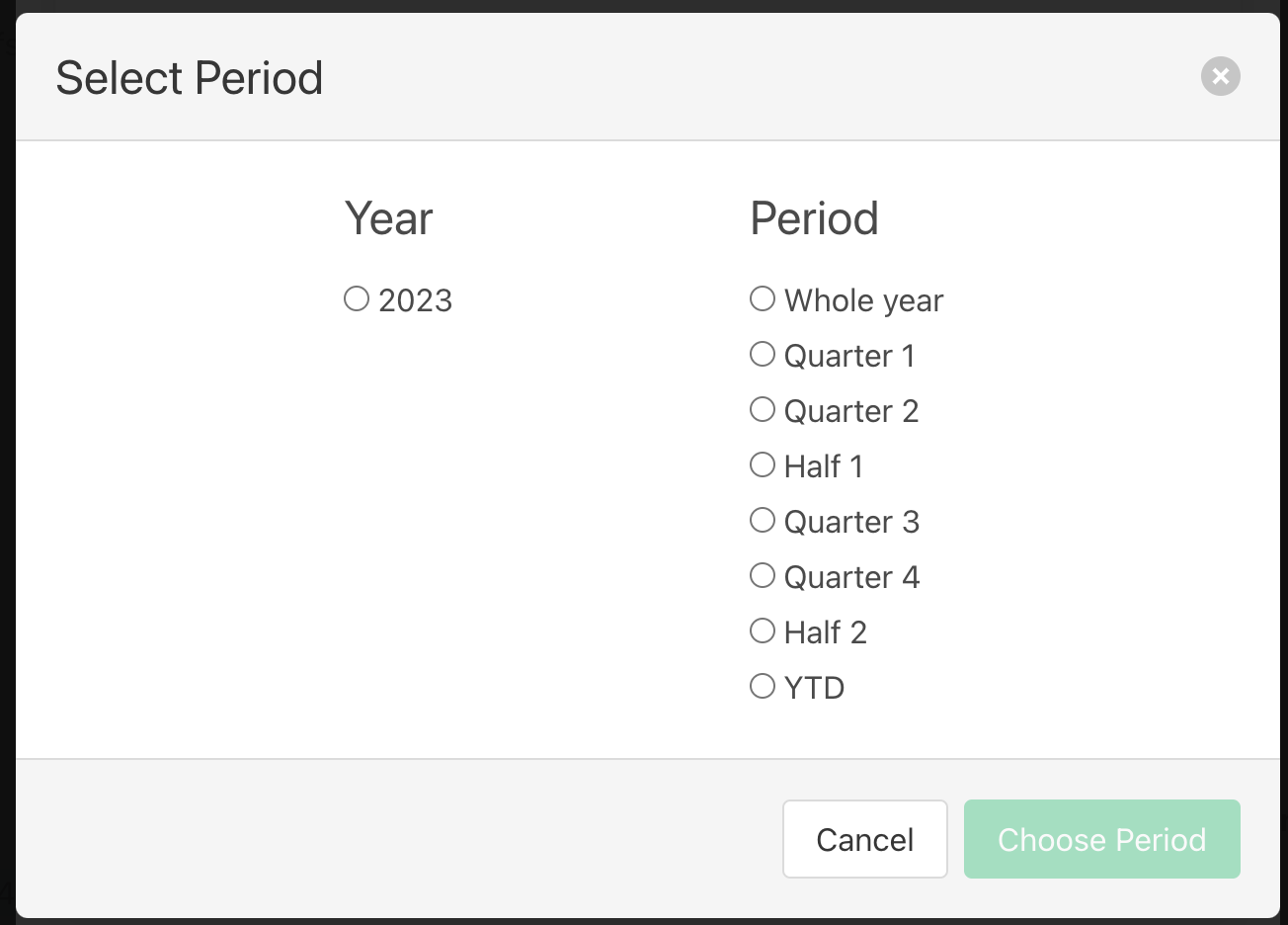
The date ranges provided when choosing a set “period” for a report such as “Quarter 1” will now state the inclusive date range. E.g. 01/01/2023-31/03/2023. Previously the date ranges for these periods were not inclusive with the last date being the first day in the subsequent period.
What’s next?
Data Quality Dashboard
Introducing our upcoming feature: a data quality dashboard. This dashboard will be key in providing insights into the quality of the data within your instance.
Some of the insights that can be expected in this new feature are:
Overview of methodologies used across each segment type - this can help identify which data sources need improving.
In the example of Air segments, ICAO+ is the methodology that will yield the most accurate results, if the majority of your air segments are in fact utilising the DEFRA methodology you can seek better data from your providers.
Data by Groupings - this will shed light on any segments that are missing groupings and also detail the total emissions coming from each grouping.
Segment Type insights - for each segment type an overview of the emissions and key data points will be explored to facilitate the identification of problematic segments that could be skewing the data if they are incorrect.
New Thrust Events Segment Types
We are excited to bring 3 new segment types to our Thrust Events users, to help ensure that the full extent of an event's emissions are captured. These new segment types are:
Shipping Segment; emissions from road freight.
Waste Segment; emissions from all different waste generated from the event.
Materials Segment; emissions from items and materials purchased. This segment will include common items purchased for events including, lanyard, banners, brochures and many more.
File enrichment
We now have the capability to enrich your travel data files with carbon emission data. You can send us data (for example, csv files through SFTP), we will then create segments in your Thrust Calculator instance based on that data, and calculate the emissions.
To your travel files, we then append new columns containing those emission calculations, and place the file back into a remote directory that you own, so you can link/process the emission data as you see fit.
Was this article helpful?
That’s Great!
Thank you for your feedback
Sorry! We couldn't be helpful
Thank you for your feedback
Feedback sent
We appreciate your effort and will try to fix the article