Summary
We’ve added an Organisation Reporting hub, allowing users to seamlessly pull data from multiple instances at once to get a full overview of the emissions from your full Thrust Organization.
If you are using carbon budgets, the new CSV carbon budgets export report will enable you to pull an annual breakdown of your departmental carbon budgets.
Improvements to API performance, providing faster response times and better reliability.
Coming next is the ability to customise the radiative forcing factor you use in your air and charter jet segments, enabling you to comply with your preferred authority.
The next month will also bring new pages to the impact report including an EV switch page to highlight the estimated carbon reductions to the car rental market, in addition to the inclusion of purchased reductions such as SAF into the reports.
Spotlight on…
1. Organisation Reporting Hub
Relevant to:
Thrust Calculator users (Enterprise, Premium, Free-tier)
Thrust Events users
Thrust Calculator resellers
We’re introducing our brand new Organisation Reporting platform to our Thrust Calculator and Thrust Events customers.
What is it?
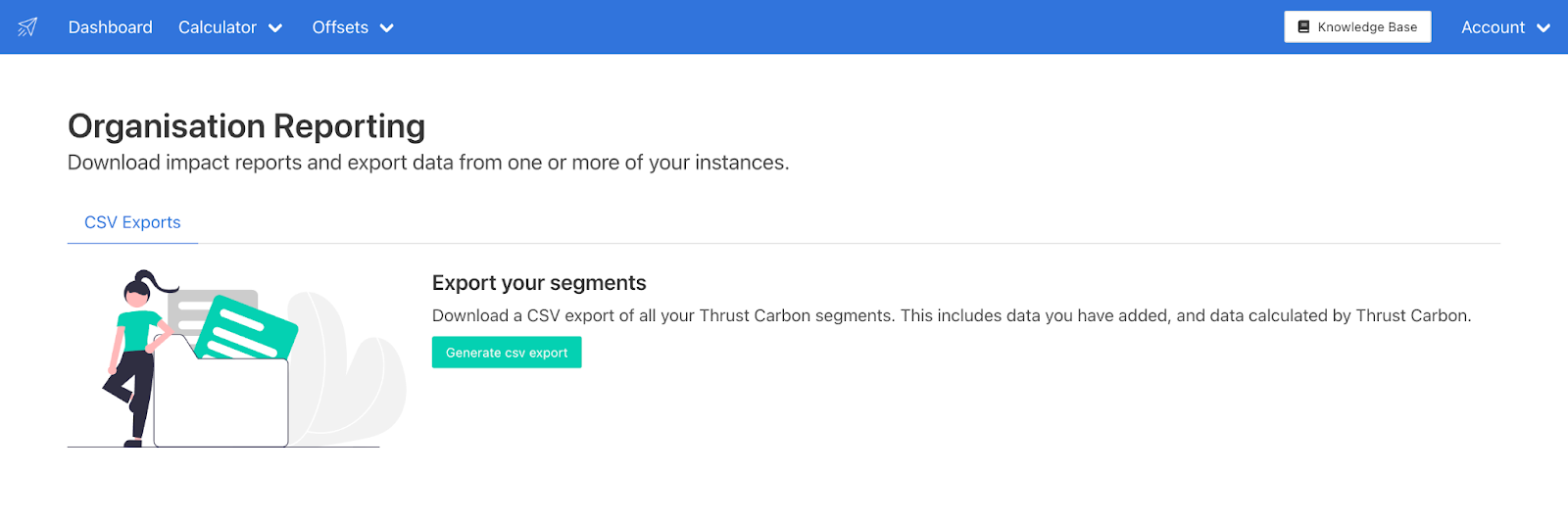
It is a page within the Thrust Calculator where you are able to generate CSV reports from multiple instances to get a full overview of the emissions within your organisation. Instead of having to generate lots of reports to understand the full impact of your organisation, you can now with just a few clicks get one report with all the data you need.
Who can use this?
If you have access to more than one Thrust Calculator or Thrust Events instance, this is a feature you will be able to utilise.
How can I access this?
To access Organisation Reporting simply log into the Thrust Calculator and click on the “Calculator” tab at the top of the page.
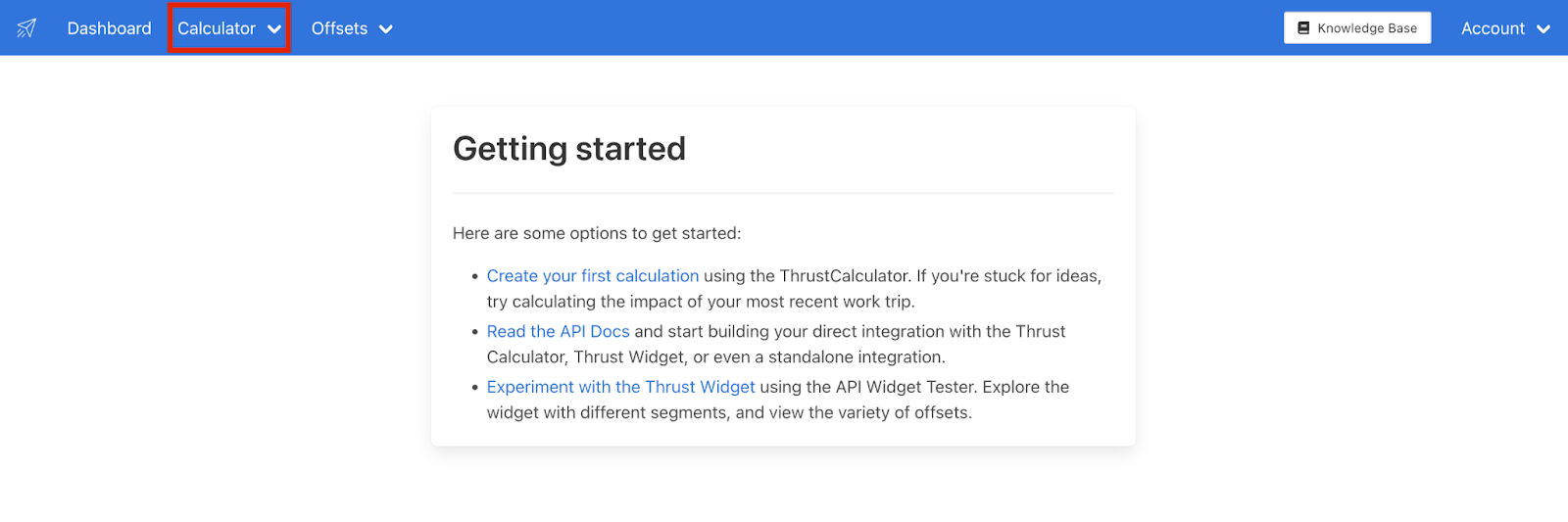
A drop down list will appear, click on “Organisation Reporting” and you will be brought to the Organisation Reporting page as shown below.
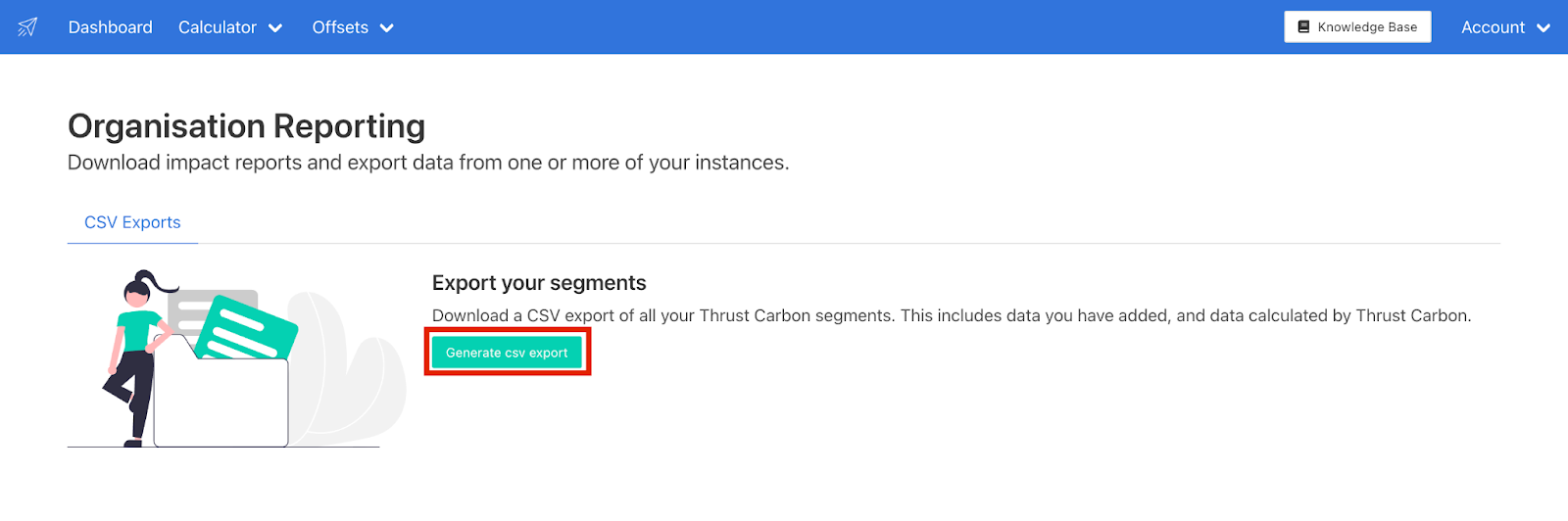
To generate a CSV report click on the “Generate CSV export” button as shown below and fill in all the input fields.
For more information on this feature check out this article: Multi Instance CSV Exports
2. Carbon Budgets Reporting
Relevant to:
Thrust Calculator users (Enterprise, Premium, Free-tier)
Thrust Calculator resellers
We have released a new reporting feature to our users who have implemented Carbon Budgets within their organisation.
Using Carbon Budgets
To ensure the proper accountability of travel carbon footprints many of our customers implement their full corporate hierarchy in the Thrust Calculator. This allows lower-level cost centres to be attributable to their parent organisational units.
An organisation with 5 top-level corporate units, each of which has 10 sub-divisions, each of which in turn has another 5 sub-divisions has a total of 105 trackable budgets. To be useful, information about carbon budget consumption needs to be consumed in a filterable spreadsheet format. This is where our new carbon budgets CSV export comes into play.
What is it?
The new Carbon Budgets CSV export feature enables you to generate a spreadsheet that includes the breakdown of carbon budgets from your organisation over a particular year. You will be able to view which departments of your organisation are over budget, and who is trending to go over budget by the end of the year.
How can I access it?
To learn more about the carbon budgets CSV export see this article: Carbon Budgets CSV Export
Updates
API Token Expiry
You asked and we listened! When generating API tokens, you can now set an expiry date, increasing the security of your integration. You can also rotate tokens through our API. Read more about it on our API docs.
API Improvements
To reduce network overhead, we have set up a new region in us-west-2.
We have made general performance improvements to our batch calculation endpoint.
What’s next?
EV Switch
Introducing our upcoming feature: a page in the full impact report on Electric Vehicle (EV) switch that will highlight the evolving landscape of carbon reduction within the rental car market. With data-driven insights and visual representations, this page will provide users with a comprehensive overview of the carbon reduction trends stemming from the growing presence of electric vehicles in the rental market. Stay tuned for a deeper understanding of how the transition to EVs is revolutionizing the rental car industry's environmental footprint.
Purchased Reductions in Impact Reports
Purchased Reductions also known as carbon insetting is the practice of implementing nature-based solutions within a company's supply chain which are designed to generate carbon reductions and carbon storage. These reductions can form an important part of a company's journey to net zero emissions. To facilitate the tracking and visibility of these purchases we will be introducing a new report page to the Thrust Calculators Impact reports. This report page will give an overview of these purchases and state the net carbon emissions after the purchases.
Custom Radiative Forcing
Radiative Forcing in the context of air travel, is a multiplier that factors in gases emitted to the atmosphere when flying at altitude and is used when measuring air travel-related emissions. We will soon be introducing the ability for our customers to choose which radiative forcing factor they wish to use from a variety of authorities, to enable you to comply with your policies or local regulations.
Was this article helpful?
That’s Great!
Thank you for your feedback
Sorry! We couldn't be helpful
Thank you for your feedback
Feedback sent
We appreciate your effort and will try to fix the article